New Student Information
Welcome to the College of Engineering! Below you will find important information for before, during, and after your initial virtual meeting with an advisor and beyond.
Once you’ve been admitted to UNC Charlotte, you’ll need to register for New Student Orientation and complete your New Student Modules. Visit the New Student Orientation Website for more information.
If this is your first time visiting this page, we encourage you to read all of the material in order to be informed and prepared for your first advising meeting as well as your first semester in the College of Engineering.
For those who may be referring back to this page, here are some quick links:
Preparing for Your Initial Advising Appointment
You will be able to schedule your initial advising appointment after you register for your in-person New Student Orientation session and complete the New Student Modules on Canvas. These appointments are conducted virtually, in a group setting. In your initial advising appointment you will be introduced to the OSDS First-Year Advising Team, overview about the W.S. Lee College of Engineering’s first-year curriculum, learn how to view your advising note in Connect and register for classes!*
Some important steps to complete ahead of your initial advising appointment:
- .Complete the ALEKS Math Assessment
- This is required for all incoming first-year College of Engineering students. *You will not be able to register for classes during your advising appointment if this has not been completed.
- Review your major’s Academic Plan of Study
- The Academic Plan of Study is a suggested 4-year roadmap for each major within the College of Engineering. Familiarizing yourself with it ahead of time will provide helpful context during your initial advising appointment.
During your initial advising appointment:
- Make sure your Zoom display name shows your full name, first and last.
- It is required to have your camera on for your appointment. Plan to join on a device with a working webcam.
- Make sure you join in a quiet environment with limited distractions.
- You are strongly recommended to join on a laptop to be able to view shared screen images.
- Please note: These meetings are for students only. Due to FERPA privacy laws, parents and other student supporters are not permitted to join the advising sessions. Please make sure you are able to sign onto your advising meeting alone and in a distraction-free environment.
After your initial advising appointment:
- Ensure any AP/IB test scores and/or official transcripts from colleges/universities where you’ve completed dual enrollment courses are sent to the UNC Charlotte Admissions Office as soon as they are available. Reach out to the OSDS First-Year advising team if you need assistance in making adjustments to your fall schedule due to credits being applied to your UNC Charlotte transcript. More information on this process can be found in our AP, IB, and Transfer Credit section.
Frequently Asked Questions (FAQs)
Below you’ll find answers to incoming students’ most frequently asked questions
The recommended courses in my advisor note do not match the courses listed in the first semester on my plan of study. What should I register for?
The courses listed on your advisor note! Your Academic Plan of Study is a guide but not everyone takes the courses exactly in the order they’re written on the plan. When determining your first semester courses, the advisor who wrote your note took into account several factors, including expected outside credits (AP, Dual Enrollment, etc.) your current math level, and your major. The foundational Engineering courses (ENGR 1300, 1301, 1302, and 1303) can be taken in any order. If your advisor note recommends a specific course/courses you should defer to those recommendations unless you receive credit for a course that wasn’t listed under the expected credits section on your advisor note.
I’m expecting credits from AP/IB courses or dual enrollment. How do I know if that has been received and applied to my UNC Charlotte transcript?
Incoming students must submit official transcripts and/or test scores for outside credit to the admissions office. Once this has been received, you can monitor your official transcript to see when the credit has been applied. More information can be found by clicking here.
I joined a waitlist, when will I know whether or not I’ll get into the class?
Unfortunately, we can’t know for sure. A student’s ability to get a seat from the waitlist is dependent on if/when a seat(s) becomes available and where you are in line on the waitlist. If/when a seat is available and you are first in line on the waitlist, an email notification will be sent to your UNC Charlotte email account. You will then have 24 hours to register for the course. See our Registration Tips section for more information.
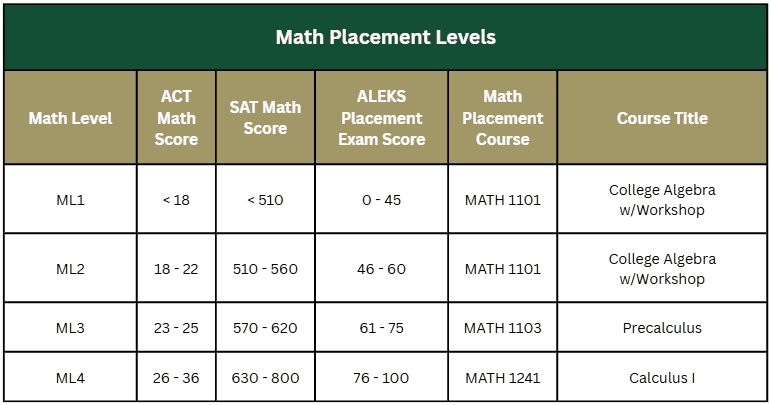
My ALEKS math assessment result placed me in a lower math level than my ACT/SAT scores or math credit I’ve already earned, do I have to start at that lower level math course?
ALEKS math assessment results do not supersede a higher math level resulting from official ACT or SAT math scores nor do they override your eligibility to enroll in a math course for which you have the required prerequisite. For information on how to submit official test scores or check if they have been received, visit the SAT/ACT test scores, AP, IB, and/or College Transfer Credit section below.
Test score example: If your ACT math score was 30 (ML4) and you submitted official test scores to our admissions office, but your ALEKS score was 50 (ML2) the higher math level will be reflected (in this example, ML4) and you would be able to register for the math course associated with that math level (in this example, Calculus I).
Math credit example: If you have earned credit for Precalculus via AP/IB credit or dual enrollment, but scored 50 (ML2) on ALEKS, your math level will be ML2; however, you may register for Calculus I (ML4) once official AP/IB scores or an official college transcript showing equivalent credit have been sent to UNC Charlotte Admissions and the credit for Precalculus appears on your UNC Charlotte transcript.
Scoring at a lower math level on ALEKS indicates a potential gap between your current math proficiency and prior test scores/earned credit. An OSDS advisor will discuss this with you during your initial advising session; however, the decision of whether or not to enroll in the higher level math course will be yours to make.
What happens if I do not start in the first math listed on my major’s Academic Plan of Study?
This is not uncommon! Students who start in a lower level math course than the math course listed on the first semester on their plan of study often take a summer course to expedite their progression through the math sequence; however, this isn’t required. Example pathways can be found by clicking here.
What is a “themes course”?
Themes courses are part of UNC Charlotte’s general education requirements. These courses are offered from departments across the university and cover a wide range of topics. Students are encouraged to read course descriptions when reviewing their options for themes courses.
More information about themes courses and tips for registering for them can be found here.
I’m trying to register for a course on my advising note but keep getting an error message. What should I do?
Sometimes, certain sections of a course have restrictions for who can register for that section. Click here to visit Niner Central’s registration information page and scroll down and click on “Registration Add Errors” to view a table of common error messages, what they mean, and what the solution is. If this doesn’t answer your question and help you find the appropriate course of action, feel free to reach out to osds-advising@charlotte.edu for assistance.
The only available section for a course I need conflicts with my other courses. What should I do?
If there is a section that has seats available but it conflicts with another class, there are a few steps you can take.
- First, you should see if the conflicting class has a different section available that you can switch to in order to make room for the needed course.
- If this isn’t an option, you should join a waitlist if possible. If/when a seat is available and you are first in line on the waitlist, an email notification will be sent to your UNC Charlotte email account. You will then have 24 hours to register for the course. See our Registration Tips section for more information.
- If there aren’t waitlists, can continue to check back to try to catch an open seat or see if seats or sections are added.
ALEKS Math Assessment
Completion of the ALEKS Math Assessment is mandatory for all incoming College of Engineering students, regardless of your ACT, SAT, AP, IB, or transfer math credit. Engineering students must complete the online math assessment no later than one week before their virtual NSO advising meeting. The first-year advising team will not lift the advising hold on your Charlotte account until you have completed the assessment and a first-year advisor has reviewed your score. Any delay will prevent you from registering for first-semester courses during your virtual advising meeting.
Your ALEKS Math Level does not override AP, IB, and/or college credit. Before the New Student Orientation Virtual Advising meeting, first-year advisors will review your ALEKS Math Assessment score alongside any anticipated or earned credit as a way to help discuss math readiness and resource options. Your score will assist Lee College of Engineering advisors when discussing your starting math course in UNC Charlotte’s math sequence and any additional resources to support your success in your first-semester math course to increase your chance of succeeding in engineering courses. Ultimately, if you decide to enroll in a math course based on test scores or college credit, you have that option.
Engineering programs can be challenging, especially for students transitioning from high school, dual enrollment, or early college. Math courses often feel familiar at first but college-level courses move at a faster pace, focus more on concepts, and require you to manage your own progress both in and out of class. Starting in the right course can make a big difference in a student’s transition into the College of Engineering. Students should approach the ALEKS Math Assessment seriously and should prepare thoroughly before taking it.
Common First Year Pathways
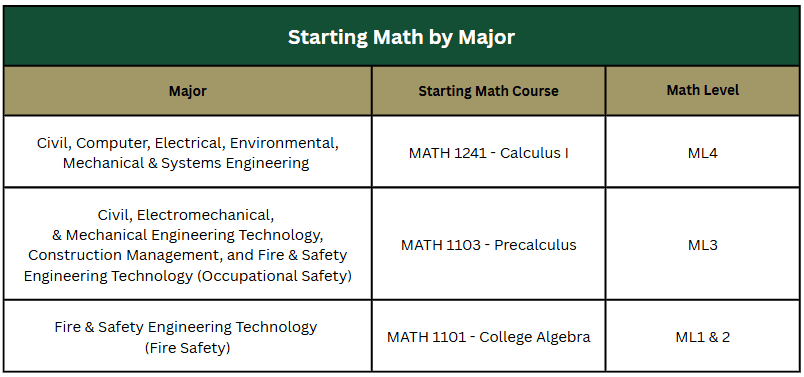
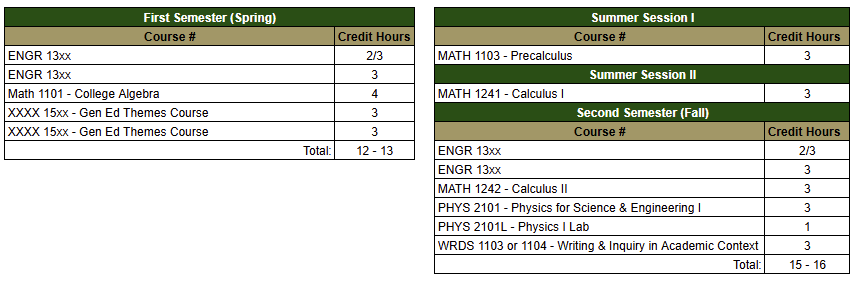
Reference the table above to see which is the starting math for your intended major. Below you’ll see the pathway through the Common First Year Curriculum based on your starting math level. These pathways do not apply to Construction Management or Fire & Safety Engineering Technology majors as these programs are not participating in the Common First Year Curriculum. Please refer to these programs’ Academic Plans of Study to view their pathways.
Placing in your major’s starting math
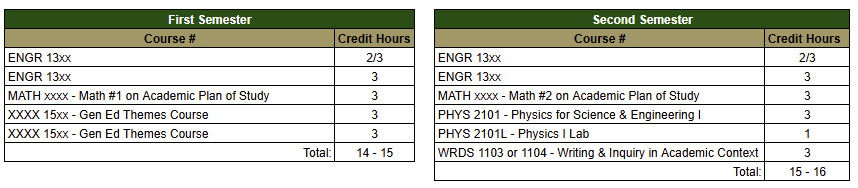
Starting one math level below your major’s starting math
Summer Start
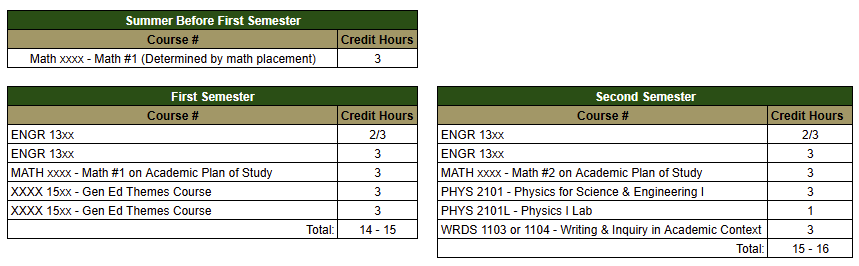
Fall Start
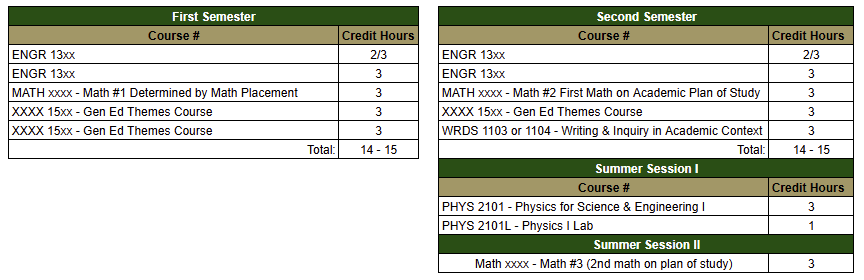
Spring Start
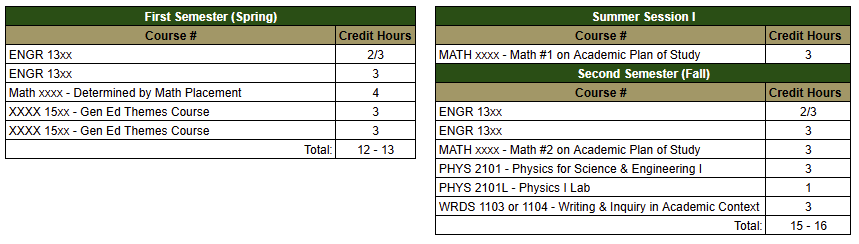
Engineering Majors who place in College Algebra (ML1 & 2)
Summer Start
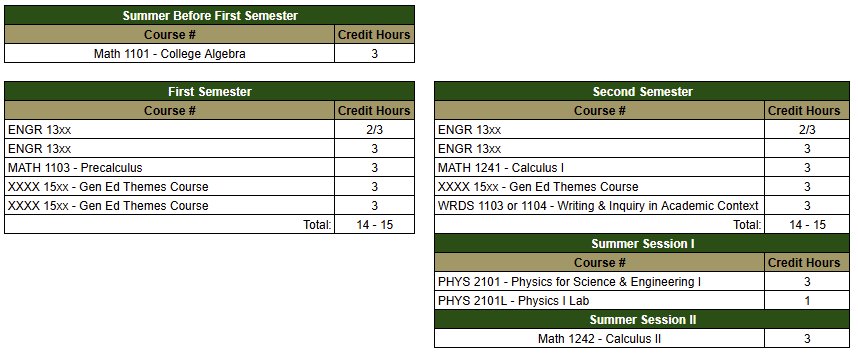
Fall Start
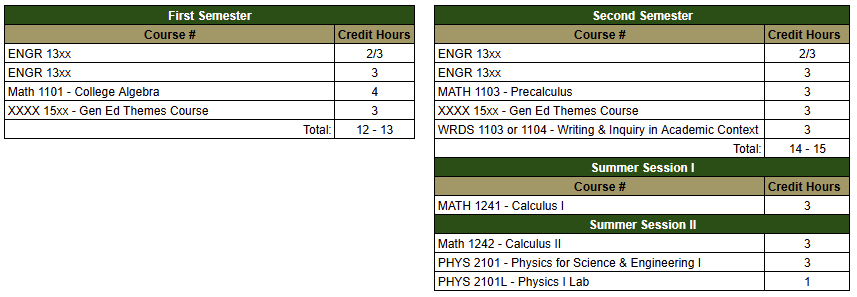
Spring Start
Foundational Academic Information
Academic Plans of Study
All majors in the Lee College of Engineering have an Academic Plan of Study, a 4 year guide that outlines the recommended sequence to complete all major and general education requirements. While everyone’s paths look different due to potential dual enrollment and/or AP/IB credits, or by starting with a different first math course than what is listed first on the plan, these plans play a critical role in assisting students in determining what courses they should take in the upcoming term.
First semester students will have their first semester courses recommended to them by an academic advisor. These recommendations will be based on the student’s major’s Academic Plan of Study, taking into consideration any previously earned or expected credits. It is the responsibility of the student to reach out to the OSDS advising team if/when AP or Dual Enrollment credits are applied to their UNC Charlotte transcript after their initial advising meeting. See the “AP, IB, and/or College Transfer Credit” section below for more information.
Understanding Your Degree Structure
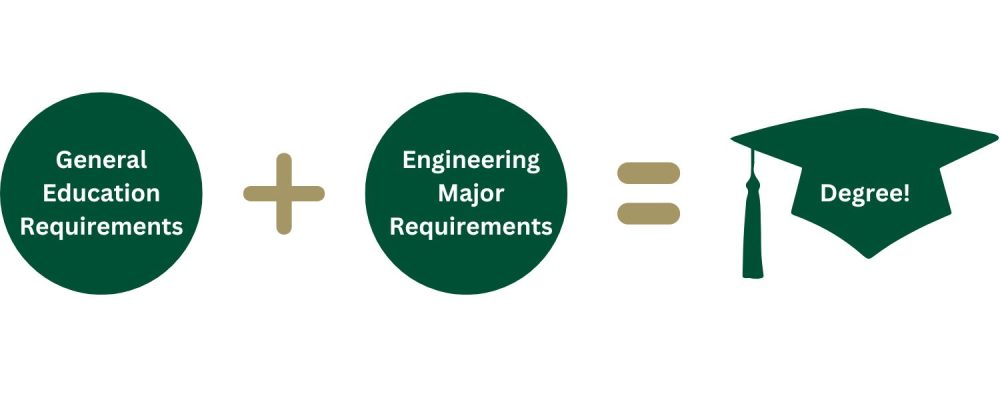
General Education Requirements are courses that all degree seeking students at UNC Charlotte must complete. You can view more information about these requirements by viewing the University Catalog. Note: all math and science general education requirements are satisfied through the completion of major requirements. Students complete General education courses alongside major requirements throughout a their academic career.
LCOE Major Requirements are the required College of Engineering courses to complete a student’s degree in their chosen major. Students can view these requirements along with their general education requirements, and the recommended sequence, by viewing their major’s Academic Plan of Study
College Progression Requirements & Common First Year Curriculum
The Lee College of Engineering’s Common First-Year (CFY) Curriculum provides incoming students with a solid foundation in math, science, engineering, and technology principles. The curriculum also offers a shared foundation in mathematics and sciences, ensuring a seamless transition to upper-level courses. Whether students are committed to a specific engineering field or still evaluating their options, this curriculum delivers the robust foundation necessary to excel in any Lee College of Engineering (LCOE) disciplines, allowing for exploration without falling behind.
More information about the foundational courses in the Common First-Year Curriculum can be found by clicking here.
Civil, Computer, Electrical, Environmental, Mechanical, and Systems Engineering & Civil, Electromechanical, & Mechanical Engineering Technology
- Complete all Core Courses (ENGR 1300 – 1303), MATH 1103 (Engineering Technology Majors), MATH 1241, MATH 1242 (Engineering Majors), PHYS 2101/2101L.
- Two attempts for each course, including withdrawing from a course with grade of W
- C or better in every course except theme courses
- Complete the first year curriculum in four semesters
- The GPA requirement at completion of the first year curriculum is 2.5 for Engineering Majors (EN) and 2.0 for Engineering Technology majors (ET)
While most LCOE majors participate in the common first year, Construction Management and Fire & Safety Engineering Technology have specialized requirements and follow a separate first-year program concentrating on industry-specific skills and knowledge.
Construction Management & Fire Safety Engineering Technology
- Construction Management Progression Requirements: ETCE 1222, ETCE 1211/L, MATH 1103, CMET 1400, CMET 2105/L
- Fire & Safety Engineering Technology (Fire & Safety) Progression Requirements: ETFS 1201, MATH 1100 and ETFS 1120
- Fire & Safety Engineering Technology (Occupational Safety) Progression Requirements: MATH 1103, WRDS 1103 and ETFS 1201
- Pass all courses within three attempts, including withdrawing from a course with a grade of W
- Complete the Freshman curriculum within four semesters
- Earn a 2.0 cumulative GPA upon completion of the First-Year core courses
- Must complete all of the above requirements before enrolling in W.S. Lee College of Engineering Junior-year courses
Read more about the Lee College of Engineering Progression Requirements by clicking here.
SAT/ACT test scores, AP, IB, and/or College Transfer Credit
Students must send all high school transcripts and AP, IB, Dual Enrollment, or Early College transfer credits to the Office of Admissions for processing. Additionally, students should monitor their UNC Charlotte Transcripts (available in Student Self-Service) to track posted credits and adjust their schedules as needed. Submission of official SAT/ACT test scores is optional but encouraged.
Submitting Transcripts and/or Scores (AP|IB, SAT/ACT, Dual Enrollment/College credit)
Official SAT/ACT test scores may be submitted to the UNC Charlotte admissions office. SAT scores must be sent through College Board and ACT scores must be sent through the ACT test website. While these scores do not provide college credit, they can determine placement for certain areas, such as a student’s math level. To check if your test scores have been received, check your student profile on your Future 49er Portal or log into my.charlotte.edu, select Student Self-Service under the Quick Links, select Student Profile, then select “Prior Education and Testing” under your photo. Received and processed scores will be listed under the “Testing” section of this page.
AP, IB, Dual Enrollment/College Transfer, or Early College transfer credits will be added to your UNC Charlotte transcript when Admissions receives your official score report, College Transfer, or Early College transcripts.
Students with college credit must request that official transcripts from the college or university where the credit was earned be sent to the UNC Charlotte Admissions Office for processing.
AP scores typically post in early July (for Summer and Fall enrollment).
- Students with AP scores must send scores through the College Board score reporting system. AP credits cannot be directly transferred from one college to another.
- To see the credit equivalencies and required exam scores, click here.
Send all official test scores and transcripts to the Admissions Office as soon as possible. Students are responsible for reaching out for assistance with any necessary schedule adjustments once their UNC Charlotte transcript reflects test scores and transfer credits.
Impact on Registration:
- AP, IB, Dual Enrollment/College Transfer, or Early College credit must appear on your UNC Charlotte Transcript in Student Self Service before you can register for the next course in a sequence.
- You will not be able to register for the next course in a sequence unless Admissions has received and added your AP, IB, Dual Enrollment/College Transfer, or Early College transfer credit to your UNC Charlotte transcript.
- For example, if you are expecting AP credit for MATH 1241 (Calculus I) but Admissions has not received your official score report, you will not be able to register for MATH 1242 (Calculus II).
- Advisors are not able to override prerequisite requirements.
How to View Test Scores | Math Level
To view the AP|IB, ACT/SAT, and Math Level, log in to Student Self Service on MyCharlotte.
- Click on Student Self-Service (under Quick Links)
- Click on Student Profile (under Student Records)
- Click on Prior Education and Testing (in left column menu)
Viewing Credits: DegreeWorks & Unofficial Transcript
DegreeWorks is an online tool that the University uses to determine if students have met the requirements for graduation. Additionally, it also shows program requirements and tracks degree progress.
To access DegreeWorks, log in to MyCharlotte, select the link for DegreeWorks found under the Teaching heading, or access it directly here. Click here to view a helpful video on DegreeWorks.
You can check your Unofficial Transcript on Student Self-Service to see if Admissions has processed your credit.
- Click on Student Self-Service icon
- Click Student Services/Student Accounts
- Click Student Records
- Click Unofficial Transcript.
Registration Tips
Below you’ll find information on the most common questions new students have during the registration process
How to View Advising Notes in Connect
- Log into my.charlotte.edu
- Click “Connect”
- Click “My Docs” on the left menu
- Click “Notes”
- Select the appointment for which you want to view the notes
View a step-by-step video by clicking here
Advisor assignments for new students will be made prior to the start of the semester. Notifications will be sent to UNC Charlotte email.
How to Register for Classes
- Log into my.charlotte.edu
- Click “Registration Add/Drop”
- Click “Register for Classes”
- Select the term for which you’re wanting to registerClick on “Find Classes” tab
- Use the search fields to find classes
- Subject = Course Prefix (eg. ENGR)
- Course Number = 4 digit number (eg. 1301)
- Select which section you want and click “Add”
- Use the search fields to find classes
- Classes will be pending until you click “Submit” in the course summary section
View a step-by-step video by clicking here
Registering for Themes Courses
As part of UNC Charlotte’s General Education Curriculum, students complete 3 Themes courses from the following categories:
- Global (both required)
- Social Science (xxxx 1501)
- Arts & Humanities (xxxx 1502)
- Local (choose one)
- Social Science (xxxx 1511)
- Arts & Humanities (xxxx 1512)
Additional information, including a list of example courses for each category, can be found in Section IV of the General Education Policy.
Tip for searching for themes courses:
- In the course search box on Self-Service, leave the subject field blank and type the course number for the category you’re wanting to search (e.g. 1501) in the course number field. Check the “open sections only” box to filter out sections that are full.
How to View Your Schedule
Log in to my.charlotte.edu and click on “My Schedule” under Quick Links. If you are currently registered for more than one term (i.e. Summer and Fall) you will need to select the term of the schedule you’re wanting to view.
Additional Tips
Waitlist – If a course is full, see if it has a waitlist and add your name to the waitlist. You will be notified via UNC Charlotte email if a seat becomes available, at which time you will have 24 hours to register for the course. Being on the waitlist is no guarantee that you will get a seat.
- Check out the information about how to use a Waitlist.
- Check your UNC Charlotte email often so you do not miss any notifications!
Academic Advising – How do I? This page contains links to common forms, videos about advising technology used at UNC Charlotte, and links to multiple common enrollment-related needs of UNC Charlotte students.
Niner Central’s Registration Information page contains the answers to most common registration questions and concerns, including:
- Explanation of Registration Errors and Holds
- Dropping a Course
Have general registration questions or concerns? Contact the Peer Hub to schedule a virtual appointment for assistance with registering for classes.
Can’t find what you need on the pages above? Email the OSDS First-Year Advising Team at osds-advising@charlotte.edu and someone will get back to you as soon as possible!
Additional Helpful Resources
Save our Linktree! The Linktree contains helpful links for information from the College of Engineering and across campus.
College of Engineering Computer Requirements – Make sure you have the right computer to meet your needs!
Getting a jump start and taking summer courses? Utilize tutoring resources in the University Center for Academic Excellence! Visit their website to view more information about tutoring availability.
Decided to change your major to something outside of Engineering?
Login to your Future 49er Portal.
Eligible students will see the Update My Major button on the top right of their portal.
- Click the button to be taken to the form.
- The form will auto-fill with the information from your application.
- Use the Intended Major to select the updated major.
- The form automatically collects your information as the form submitter in the Current User fields.
- In Intended Major, select the requested major update.
College of Engineering students wishing to change to another major within the College of Engineering should contact the OSDS First-Year Advising Team at osds-advising@charlotte.edu
Advisor Assignment
You will be notified of your advisor assignment shortly before the start of your first semester.